

I)Introduction
There have been many home labs built, destroyed and rebuilt (some many times) over the years. For the technical side of a profession it is a necessity to have a place to carry one’s own agenda without risk of disrupting daily activities. A home lab can be in an incredibly large number of forms from a single server that’s running a bare metal operating system to complex, multi rack solutions that involve dozens of systems. Developers tend to even use their laptop with no external infrastructure. No matter the size, the value comes from the ability to learn new things.
This guide will cover not only practical knowledge but also philosophy around designing and building a lab.
II)What should a home lab look like
A home lab should do three things; Preserve operational continuity of what its users are doing and be flexible enough in its configuration to achieve the goals at hand while being expandable to meet future goals. This is a good lesson if you’ve never written out a business case before. Write out what you want to achieve, or a theme you are aiming for. For my lab, the question is “Is a post VMWare era viable today?” I could add the questions of “what would the limitations be” and “what skills/retraining would people have to do” to that as well. There are likely several questions that will be added as I go along.
To this end, what hardware does one pick? There’s a sea of endless options out there. Some advice I have is:
-Be careful about hardware specs if you’re inexperienced. It’s easier in many ways to buy the wrong thing than the right thing, especially for network gear.
-With the above being said, a general server can be very flexible and adaptable.
-Small isn’t always bad. Plenty of massive scale, critical infrastructure projects started life out being developed on laptops.
-You’re probably buying used. Even the pros tend to transition hardware from prod to non-prod uses to maximize the value from it. The usual suspects (Ebay, Marketplace, Craigslist etc.) can provide hardware valuable to the home lab operator at great discounts
-If you’re lucky, you can get good used gear from a place of work or someone who’s in the industry. Some times this gear can even be free, as it costs companies money to dispose of hardware. Obviously ask your manager for approval before taking hardware.
-A word about integrity and data security. If you are getting equipment, never take drives or data bearing items like tapes from compliant environments unless appropriately sanitized in a policy compliant manner. Many times drives will be shredded in these environments. If for some reason a system has data on it, respect that data and delete it in a secure manner. Treat that data with the respect you would want your own data to be treated with and respect peoples’ and companies confidentiality. Part of being a sysadmin is having the utmost respect for the data of others, and to understand the responsibility that encompasses.
-Get drive sleds with a server if you don’t get drives. A server with eight drive sleds is likely forty plus dollars you don’t have to spend. Dell is pretty good about generations of sleds interchanging but other servers like Supermicro can have lots of variants.
-Be cognizant of noise when buying equipment. Servers can be very noisy. In general the bigger the chassis the slower moving and therefore quieter the fans will be. Enabling power save mode for the lab is a good thing, as it will typically make the systems much quieter.
-Power can be a lesser concern to many, but it may be a concern to you. As an example, Pentium Ds in their day consumed huge amounts of power especially for their capability. They’re just junkers now. Fewer, more powerful CPUs with less total power consumption are better. Less DIMMs of RAM are better as well. SSDs are better than spinners. You’ll have to weigh the cost vs the benefits. In general most people are better off spend a few dollars extra to scale up, not out. At idle a Xeon based server consumes 120-240W. You can amortize the extra expense fairly quickly. A server running at an average power of 180W 24X7 is going to burn about $.78/day in power assuming you’re paying .18/KWH. That means the server will cost me about $283 a year to run in power alone, and that going with fewer CPUs that have higher performance for the power consumption can pay for themselves fairly quickly.
ED 13-MAR-2026:
I bought a Cisco C240 server without realizing it was 220V only. Although I was able to fix the problem via getting 220V power, that may be out of the realm of many. Be careful with purchases and establishing they are 110V capable. It says it on the power supplies, so if you have to ask your seller to check.
It’s a good lesson for people moving equipment or doing new build outs as well, I had a call when I was a field engineer for the same problem. Once again, lab work applying to the real world.
-IPMI/Ilo/iDRAC/BMC/whatever you call it is a major convenience. There can be different license levels but the ability not to have a monitor, keyboard and mouse connected is really nice. Virtual media makes installations easier. The ability to power cycle a machine from another room over is also a nice luxury. You can also save a few bucks by powering off systems as you’re not using them. If you don’t have a remote management card, you may be able to power them up remotely using WOL as well.
-Don’t be afraid of “white box” servers. Supermicro, Quanta, Intel etc. These servers are good enough to be resold as appliances by companies such as Barracuda, EMC, RSA or other players. Yes there’s proprietary hardware out there especially in the storage space but it’s less common than it used to be. An old mail filtering appliance or other device may make a great home lab machine.
-If you are doing multi-device system configurations, basics like velcro for cables are really nice to have.
-Buy the correct length cables if you can. A few extra dollars for cables that aren’t twice the correct length gives a clean look that allows one pride in what they’re doing. It also makes troubleshooting significantly easier.
III-Software
Some software is freely available, some is not. This can present challenges for the home lab operator. Depending on one’s objectives, this can be a minor road block to a major hurdle. As an example, if one wants to learn about hypervisors there are a myriad of low to no cost hypervisors out there. If one wants to learn about VMWare then it’s a major road block and other avenues may need to be explored.
What software is needed will be defined by the goals. With the scenario above, testing centralized logins may require a source of LDAP. This can be an open source implementation or using Active Directory. Although AD may be preferred because it’s in general more common, it may be implausible due to being proprietary software and the work to set a Windows Domain up.
IV-What leads to failure?
Having failed many times at building labs, I can say that it’s a requirement to some degree. The failures are in many cases more educational than the successes are. Understand what caused the failure and what the next iteration will look like.
Some of my failures (experiences) include:
-Buying too much hardware initially
-Not understanding the hardware I needed to buy vs the goals I had
-Not having data resiliency built in
-Losing interest after trying to deploy something of a massive scope
-Overly ambitious goals for one’s experience
Some of these failures manifest themselves in ways they are actually unexpected successes. As an example, I gained a lot of expertise in the ability to spec networking equipment because of things I purchased that were incorrect. I learned that spending time looking up hardware specs before purchase was valuable, and that I needed to have a concrete idea of what I wanted to do before hand and the parts needed to work together. Another example is having used hard disks that caused my data to be lost even with RAID. Backups would have been really nice. Both of these lessons have improved my general IT skills and understanding as well as my home lab iterations.
For the goal of evaluating alternatives to VMWare, I have a spreadsheet I have made. This is based on my experience in the industry and using VMWare quite a bit. The shops I have been at tend to use the hypervisor functionality and not necessarily a ton else. This is the angle I’m going to go after, because I believe this encompasses a significant share of the market based off past experiences. Companies that are deep into things like Orchestrator, Site Recovery Manager, or vROps are going to have a more durable, longer term with VMWare and a longer, more complicated migration path. Having multiple scenarios such as a combination of data center and remote office/back office sites will also make the requirements more challenging.
V-Finally, the architectures
My initial server has 32 cores and 256G RAM. It has an LTO4 drive that I will be using for backups, but that architecture is to be determined. I have two pairs of SSDs, one set 160G and the other set 1TB. The 160G SSDs are for booting and storing ISO images while the 1TB SSD is for the VM data.
The hypervisor on the bare metal server will be Proxmox VE. There are a few reasons for this. It’s Linux based, it’s got good community support and it’s affordable if I want to license it at some point being about $350/year for two sockets for the base level license. On this hypervisor will be installed nested instances of the hypervisors and other infrastructure needed.
This server will initially be used in two configurations designed around testing things like management, networking, VM Migration, and how storage behavior works.
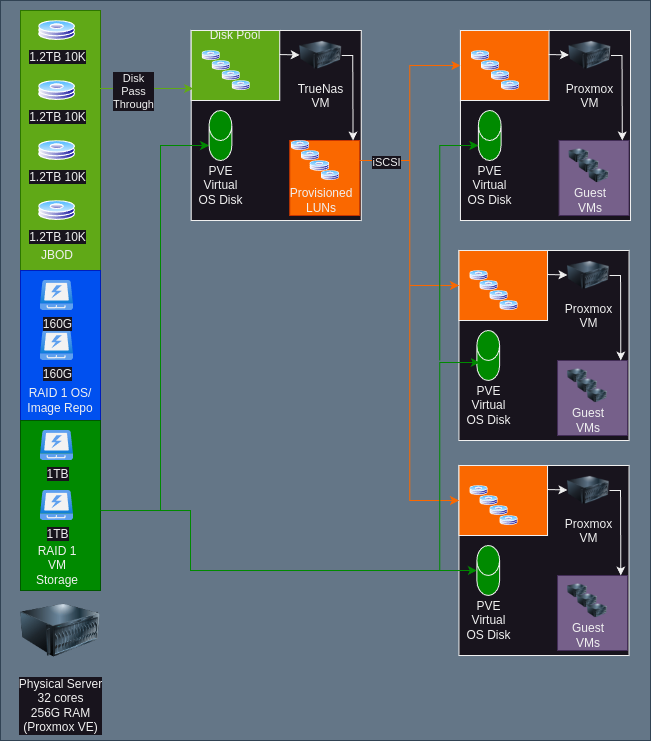
This architecture is based off having three Proxmox VMs and a single virtual storage array. I have TrueNAS listed, but this may wind up being another product. The disks are directly passed through to the TrueNAS VM as JBOD. Ideally there would be a separate HBA in IT Mode to do this with, but in this case the drives will be set up as single disks. There are multiple SAN/NAS products that would drop in with minimal change here. Besides iSCSI, it would likely be plausible to do NFS/CIFS based storage as well. This replicates a typical SMB environment with a storage array and a few servers.
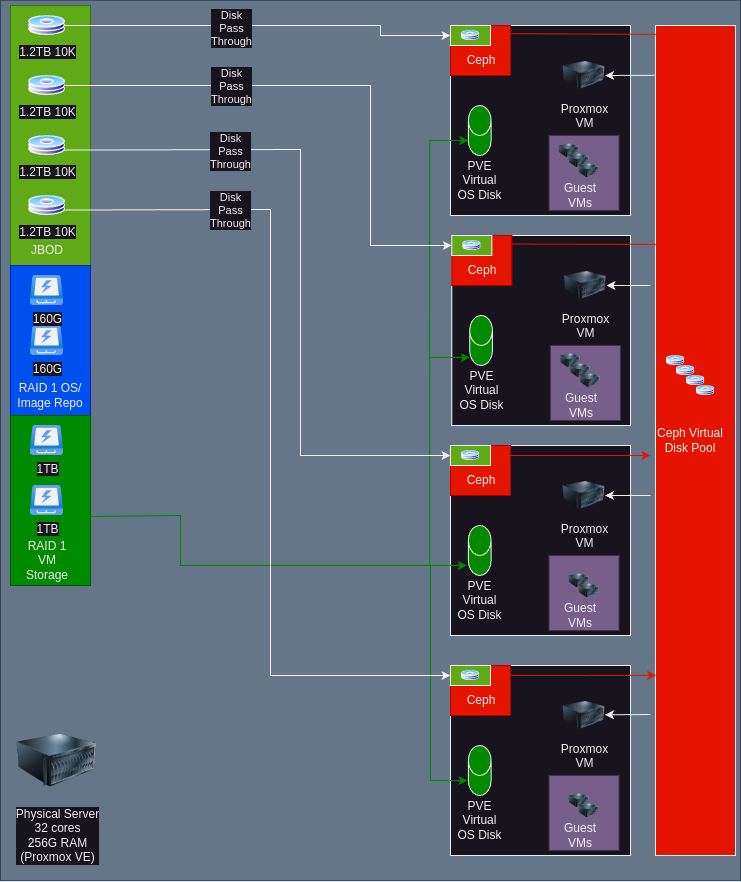
The other architecture that is to be tried is using Ceph. Ceph is an open source, software defined solution. It’s used commercially in products like Fujitsu Eternus and has scaled to multiple Petabytes of storage. It offers multiple presentation methods but the one that will be used here is the native Ceph block device subsystem. This architecture emulates a hyper converged scenario such as would be similar to Acropolis AOS on Nutanix or VMWare’s VSAN. It is worth noting that Proxmox also supports CephFS (file) for migration as well. Although it’s supported, I question why use it because block will likely handle things like locking and performance better.
Something else that likely will get added to this lab eventually is a third architecture, fibre channel based storage. It is absolutely possible to do fibre channel on a budget in a lab, without a storage array. It takes a bit of hacking, and could be an article in its self. Maybe part 2?
Another thing that could happen is hypervisors could get swapped out. XCP-NG and possibly Open Nebula are also on the test list. The architectures would likely look similar to the ones above.
VI-Conclusion
If you stuck along this far, thank you. If you have any questions or feedback, my email is in the about section. Feel free to drop me a line. I am also happy to discuss how to make these concepts a reality in your production environment.
[…] architecture for this implementation consists of a my virtualization host (see The Homelab Manifesto for a complete architectural review) using built in storage to dump the VMs to. This is currently […]