

I)Introduction
This document is part of a three (ED:four) part series that will cover the basics of configuring networking on Proxmox similar to basic configurations within VMware. The intended audience is someone with limited Linux skill who is transitioning away from VMware or someone who is new to virtualization and needs to understand what a basic network architecture for connecting a virtualized server to a network looks like.
It is my opinion that while different, the network configuration capabilities of Proxmox within its GUI are excellent. Not only that, but there is the added benefit of being able to work with the configurations via CLI, which makes them easy to copy from host to host, or to automate using standard Linux tools such as Puppet, Chef, Salt, or the Infrastructure As Code (IaC) tool of your choice.
II)Key Networking Concepts
Basic configuration of a hypervisor host should have two simple goals in mind; The first is to segment traffic based on its nature (storage, management, VM traffic of specific types.) The second is to provide redundancy in case of network link disruption. Both Proxmox and VMWare offer significant flexibility in how this is done, but the two most important concepts to achieve these goals are VLAN trunks (also known as 802.3.1q or “dot1q”) and bonds. In this article, 802.3AD (also called LACP (Link Aggregation Control Protocol) will be discussed as well as active-passive linking.
This guide is not a substitute for basic networking education, although it will get you started. CCNA material is incredibly valuable for server administrators, and I am of the opinion that all server adminisrators should at least be familiar with the concepts it conveys.
This guide does not cover technologies such as Software Defined Networking/VXLAN, VPN, or routing in any detail.
IIA)VLAN isolation (and subnetting)
It is impossible to talk about VLANs without talking about subnets. Consider a case study. An organization has accounting, R&D, and manufacturing departments. These departments should be isolated from each other so that things like payroll and trade secrets can not be looked at by people they should not. Infrastructure management should be isolated from these departments as well. Because of this, each subset of these groups will have their own VLAN and their own subnet. These subnets only talk to each other through a router and/or firewall, and in doing such policies can be put in place isolating access. Any system on the same subnet/VLAN can talk to each other freely.
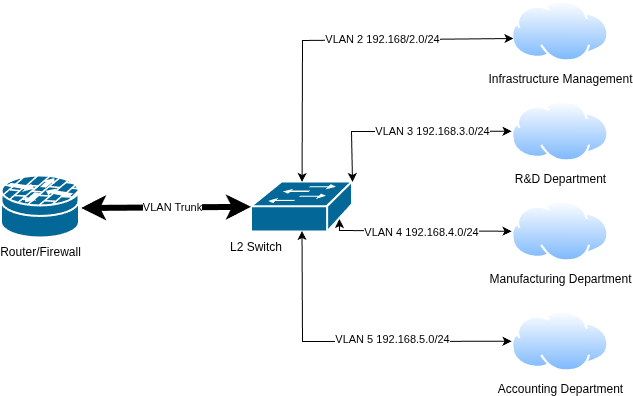
No public Internet is portrayed to simplify the diagram. The VLAN Trunk is configured to allow multiple subnets/VLANs to traverse a single link or link aggregate while maintaining subnet/VLAN isolation. There is no need to have a link between the router and the switch for each VLAN to ensure isolation.
IIB)Fail over and Link Aggregation
Although fail over and link aggregation are grouped together, they are two different things. The primary goal of either is to ensure redundancy, with the possibility of increased network bandwidth in the case of link aggregation.
The most basic form of redundancy is at the link level. An example of this is a loose network cable becomes disconnected. If the server has link level redundancy, it will stay up.
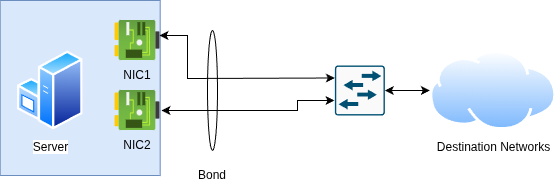
The term “bond” is used very carefully here. A Link Aggregate Group (LAG) is a type of provides link level redundancy, but it can also provide bandwidth benefits. A bond not be two physical links either. As an example, LACP supports up to eight links in an aggregate. Non-LAG alternatives include active-passive and round robin. These operate at the server level and do not use LAGs.
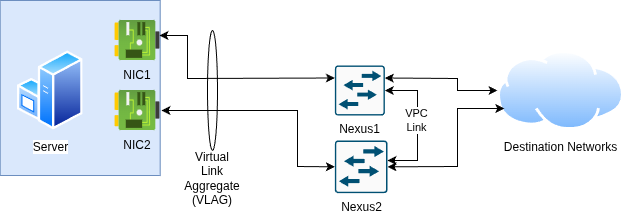
LACP is viable with a single switch or within certain switching architectures. Cisco Nexus supports Virtual Port Channel (VPC) architecture as an example. With this, you can set up an 802.3AD link aggregate across two switches. This expands the link level redundancy to switch level redundancy. Other architectures are likely similar, however many architectures do not support VLAG type functionality.
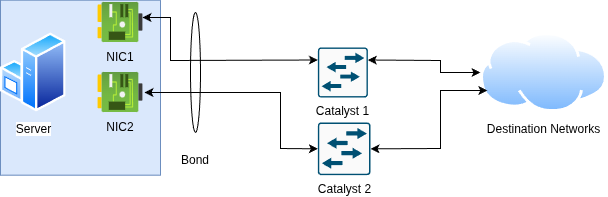
For architectures that do not support LAG functionality such as un-stacked Catalyst Switches, use of round robin or active/passive links becomes mandatory because LACP is not supported across the switches.
IIC)Putting the peanut butter and chocolate together
These technologies can be run independently from each other or paired together. A single link can have multiple VLANs trunked across it, or a single VLAN can be used with link aggregation, fail over or round robin. In the data center world however it is extremely common to combine them. A bond is built out first, followed by putting a VLAN trunk across it. This permits redundant, isolated traffic to traverse from a server to the network at large.
III)Conclusion
This is the first part of this series. The next part will be more “hands on” and about what configuration of these subsystems look like in both ESXi and in Proxmox VE.
[…] part One, the fundamentals and theory behind network configuration were covered. In part two, these theories […]